Home Services Results CRM Executive About FAQ Get started

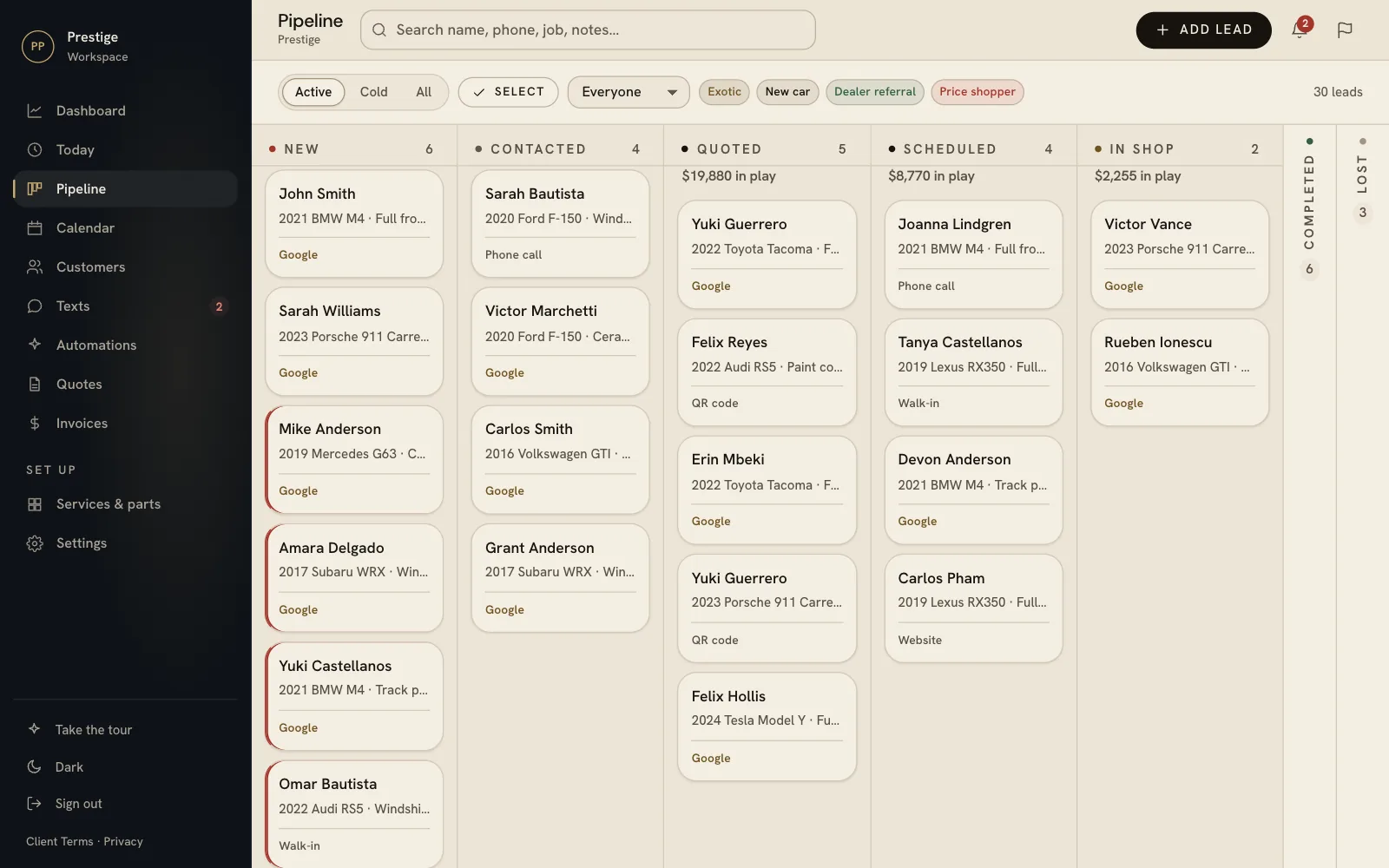
01 · The board

See every job at a glance.

Every enquiry on one board, sorted by where it stands. Drag a card when the job moves.

  • Website form leads arrive in seconds
  • Calls and walk-ins added in a few taps
  • A red edge means nobody has replied yet
  • Your stages, named your way
Pipeline board with quoted totals at the top of each column

02 · The customer

The whole story, one tap away.

Call, text or email in one tap, with the vehicle, job, price and notes beside it.

  • Call, text and email from the lead
  • Job details and photos with each customer
  • Every past job and what they spent
  • Hand a lead to someone on your team
A lead opened beside the board, with call, text and email buttons, stage, contact details and job details

03 · Today

A list of who to call, every morning.

New leads nobody has answered, jobs booked in and follow-ups due. Same list by email each morning.

  • Newest leads first, with how long they have waited
  • Follow-up reminders on the day you set
  • A daily email of who to chase
  • Add it to your home screen like an app
The Today screen on a phone: three new leads not answered, one appointment, and a call-these-first list

04 · Quotes and invoices

Send a price. Get a booking back.

They approve the quote on their phone and pick a time. Later they pay the invoice by card.

  • Quotes customers approve on their phone
  • Booking from your real opening hours
  • Invoices paid by card, into your bank
  • A Google review request after the job
Quotes on a phone: the ones gone quiet, what is waiting on customers, approved jobs and the approval rate
The shop's board on a phone

05 · Follow-ups

Follow-ups that send themselves.

Ready-made follow-ups for your trade. Switch one on, and it stops when they reply.

  • Ready-made for your trade, picked for you
  • Every word is yours to change
  • Stops the moment they reply
  • Only between 8am and 8pm, only to customers who said yes to texts
Recommended for your business on a phone: a coating maintenance reminder, detailing appointment reminders and a PPF inquiry follow-up, each with Preview and Install

06 · The builder

Build your own, block by block.

Text, wait, check the quote, hand it to your team. Test it before anything sends.

  • Drag a block in and it joins up on its own
  • Different steps for customers who reply and those who don’t
  • A test run first, with nothing sent
  • Every version kept, and on or off on a schedule
The automation builder: a text, then wait two days for a reply. Replied tells the team; no reply checks whether the quote is over $2,000 and either assigns the lead or sends an email

07 · Results and your team

See what your follow-ups bring in.

How many went out, who replied, who booked and who paid.

  • Replies, bookings and won jobs after each follow-up
  • Every step, for every customer, in order
  • Owner, manager and team member access
  • A heads-up when something needs you
The Automations overview: 130 automated messages sent in 30 days, 94% success rate, and of 37 customers reached, 29 replied, 10 booked and 5 became won jobs

08 · Your numbers

Where every lead and call came from.

Google Ads, your site, Maps, a QR code or a walk-in. And which calls still need a call back.

  • Leads by source, week by week
  • Which services bring in the money
  • Missed calls, with the voicemail
  • Calls tracked to the ad or listing
Dashboard: leads over time, where leads come from (Google Ads 70%, website form 12%, phone call 9%, QR code 5%, walk-in 5%) and top services by revenue
Two missed calls to return, one with a voicemail, and where calls come from: website, Google Maps listing and Google Ads

How it works

Up and running in a day.

No sales call needed. Sign up online, and we do the setup with you.

  1. 01

    Sign up

    Pay online by card. It takes about two minutes. Start here.

  2. 02

    Make your login

    You pick your email and password before you pay, and your workspace is ready on that login a minute later.

  3. 03

    15 minutes of setup

    Your hours, your services and how long each job takes, so customers can only book times you are open.

  4. 04

    Leads start landing

    We help you connect your website form, and every enquiry goes straight onto your board.

What you get

Everything in Shop CRM.

  • Lead pipeline
  • Customers and job history
  • Calendar and bookings
  • Quotes customers approve and book from
  • Invoices customers pay by card
  • QR codes that track where leads come from
  • Review requests after each job
  • Your own website form
  • A daily email of who to chase
  • Automatic follow-ups, ready-made for your trade
  • A builder for your own follow-ups
  • Unlimited team logins, with owner and manager access

Questions

Before you start.

Do I need a website?

No. You can add leads by hand from a call or a walk-in in a few taps. If you have a website, we help you connect its form so enquiries arrive on their own. If you want a better site, we build those too.

Does it work on my phone?

Yes. It runs in your phone's browser, and you can add it to your home screen so it opens like an app. Your team can use it on any phone or computer.

How many people can use it?

As many as you like. Every login is included in the $199, and each person sets their own password.

What happens after I pay?

You make your login first and sign in straight after paying. Setup takes about fifteen minutes, and we are an email away if you want help.

Will it text my customers on its own?

Only what you switch on. A follow-up you add arrives switched off, so you can read it first. Follow-up texts go out between 8am and 8pm, only to customers who agreed to texts, and never to anyone who replied STOP.

Is there a contract?

No. Shop CRM is month to month. The details are in our Client Terms.

Do you also run ads?

Yes. The CRM comes with every ads plan, and if you move up within 90 days, what you paid for the CRM comes off the setup fee. See our services.